




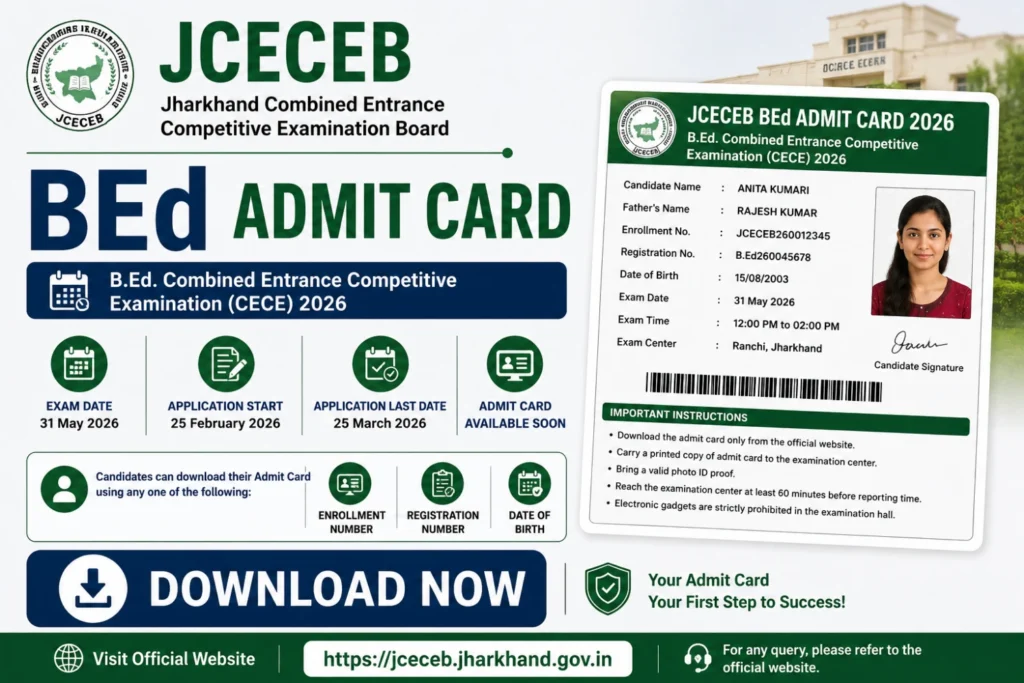
JCECEB BEd Admit Card 2026: Jharkhand Combined Entrance Competitive Examination Board (JCECEB) has announced the admit card release details on its official website for the B.Ed. Combined Entrance Competitive Examination (CECE) conducted for admission into the two-year B.Ed. course for the academic session 2026–28. The entrance examination is scheduled to be held on 31 May 2026.
Thank you for reading this post, don't forget to subscribe!The online application process began on 25 February 2026 and continued until 25 March 2026. Candidates who successfully registered for the examination will soon be able to download their admit card by logging into the portal using their Enrollment Number, Registration Number, or Date of Birth. The direct download link will be available below.
Table of Contents
The JCECEB Jharkhand BEd Admit Card 2026 is a crucial document for candidates appearing for the BEd entrance examination conducted by the Jharkhand Combined Entrance Competitive Examination Board (JCECEB). This hall ticket serves as proof of registration and grants access to the examination hall. Without it, candidates will not be allowed to sit for the exam, making it essential to download and print it well in advance. The admit card contains vital details such as the candidate’s name, roll number, exam center, date, and timing, ensuring a smooth examination process.
Why the JCECEB BEd Admit Card is Important
The admit card is more than just an entry pass; it is a validation of your eligibility to appear for the BEd entrance exam. Authorities strictly enforce the rule that no candidate will be permitted to enter the examination hall without a valid admit card. Additionally, the document includes specific instructions that candidates must follow during the exam. These guidelines ensure fairness and discipline throughout the examination process. Therefore, ensuring you have your admit card ready is not just a formality but a critical step toward securing your chance to qualify for the BEd program.
Steps to Download Your JCECEB BEd Admit Card 2026
Downloading your admit card is a straightforward process, provided you follow the correct steps. Here’s a step-by-step guide to help you:
1. Visit the Official Website: Start by navigating to the official JCECEB website. This is the only authorized platform where admit cards are released.
2. Locate the Admit Card Section: Look for the link labeled “JCECEB Jharkhand BEd Admit Card 2026” on the homepage or in the notifications section.
3. Enter Required Details: You will be prompted to enter your registration number and password or date of birth. Ensure the details are accurate to avoid errors.
4. Download Your Admit Card: After submitting the information, your admit card will be displayed on the screen. Verify all the details carefully.
5. Print a Copy: Once verified, download the admit card and take a printout. It is advisable to keep multiple copies as a backup.
Common Issues and Troubleshooting
While the process is simple, some candidates may encounter issues while downloading their admit cards. Common problems include forgotten login credentials, incorrect details, or technical glitches on the website. In such cases, candidates should not panic. Instead, they can use the “Forgot Password” option to retrieve their credentials or contact the JCECEB helpline for assistance. It’s also recommended to use a stable internet connection and a compatible browser to avoid interruptions.
Key Instructions for the Exam Day
Once you have your JCECEB Jharkhand BEd Admit Card, it’s essential to familiarize yourself with the instructions provided. Here are some important points to keep in mind:
– Carry Valid ID Proof: Along with the admit card, candidates must carry a valid photo ID proof, such as an Aadhar card, passport, or driver’s license.
– Arrive Early: Reach the examination center at least 30 minutes before the scheduled time to complete the entry and verification process smoothly.
– Follow Exam Rules: Adhere to all exam hall rules, such as not carrying banned items like electronic devices or unauthorized materials.
– Check Exam Details: Double-check the exam date, time, and venue on your admit card to avoid any last-minute confusion.
What to Do If Your Admit Card Has Errors
In rare cases, candidates may find discrepancies in their admit card details, such as incorrect names, photos, or exam centers. If you notice any errors, immediately contact the JCECEB authorities through the official helpline or email. Provide them with the necessary documents to rectify the mistake promptly. Do not wait until the last minute, as corrections may take time.
Conclusion
The JCECEB Jharkhand BEd Admit Card 2026 is a vital document that ensures your participation in the BEd entrance exam. By downloading it on time, verifying its details, and following the instructions, you can eliminate unnecessary stress and focus on performing well in the examination. Remember, preparation is key, and having your admit card ready is the first step toward achieving success in this competitive exam.
FAQ:
Q1.How to download up b.ed admit card?
To download your UP B.Ed. JEE admit card, visit the official Bundelkhand University website. Log in using your registered User ID and Password, complete the Captcha, and click “Submit” to view and download your hall ticket
Q2.How can I download jharkhand admit card 2026?
To download your Jharkhand 2026 admit card, you will need your login credentials (e.g., Application Number, Date of Birth, or School ID). Follow the steps tailored to your specific examination
Q3.How many marks are there in jharkhand B Ed entrance exam?
The Jharkhand B.Ed Entrance Exam carries a total of 100 marks. The paper consists of 100 multiple-choice questions (MCQs), where each correct answer awards 1 mark and 0.25 marks are deducted for every incorrect response.
Trending Articles :
- Railway ALP Recruitment 2026
- CRPF Constable Tradesman Recruitment 2026
- TCS Recruitment 2026
- UPSSSC ASO 2026 Online Form
- TSPSC Job Notification 2026
- TS Intermediate Results 2026
- SSC GD Constable Exam Slot Selection 2026
- CRPF Constable Tradesman Online Form 2026
- BPSC 72nd Pre Online Form 2026
- LIC HFL Jr Assistant 2026 Apply Online
- UPSSSC ASO 2026
- Assistant Loco Pilot 2026
- SBI Trade Finance Officer Recruitment 2026
- Railway RRB Technician Online Form 2026





Leave a comment